Choose ownership. Choose sovereignty. Choose Altius.
WordPress plugins
The team workspace
your business owns.
Channels, chatrooms, messaging, files, a knowledge base, and an events calendar, running on your own WordPress site, in your own database. Not rented. Not expiring. Yours.
Book a five-minute walkthrough Compare it to SlackThe part nobody mentions at signup
Most teams run their daily communication on the free tier of a big-name chat tool, and most discover the catch too late: after 90 days, your history disappears unless you start paying rent on your own conversations. The decision from March. The file from last spring. The answer someone wrote up carefully, once, so nobody would have to ask again. Altius Workspace takes the opposite view: your team’s knowledge is an asset, and assets belong on your balance sheet, not on somebody else’s server.
One workspace, one glance
The sidebar keeps every part of the Workspace one click away: your libraries, chatrooms, messages, calendar, and channels, with an unread badge when something is waiting. Drag entries into your own order, collapse the rail to an icon strip when you want the room to yourself, or switch to the classic card dashboard on your profile. Your Workspace, arranged your way.
What it does today
Everything below is shipping now. No roadmap promises in this section, just the product as it runs.
Channels, the way you'd design them
Channels keep a team's, cohort's, or client's world private to its members: resources, discussions, events, and chat, all scoped to the channel. Everyone sees only their own channels, each with an activity page showing recent files, live discussions, and what's coming up. Trusted editors can be granted the right to create channels themselves.
Chatrooms with permanent history
Ongoing group conversation, the thing chat tools are for, with the thing they take away: history that never expires. Open a room to a whole channel or keep it private and invite exactly who belongs. Live links, a "who's in the room" line, and messages that arrive in a breath. Say it once in 2026, find it in 2030.
Team messaging that carries weight
Private conversations with CC, live links, and up to four attachments per message, 200MB combined. Your messages tint blue, everyone else's warm, so a thread reads at a glance. A one-click emoji row answers a message with a 👍 when that's all it needs.
Voice notes
Record up to three minutes in the browser, listen back, attach, send. Voice notes play right in the thread, no download, no app. Sometimes thirty spoken seconds beats ten typed minutes.
A desktop reading pane
On a wide screen the inbox splits in two: conversations on the left, a reading pane on the right. Click through your messages without leaving the page, voice notes playable in place.
Notifications that respect you
New-message emails, on by default with a personal off switch. Optional desktop notifications per device, so a message pings you while you work in another window. Resource announcements are opt-in per upload: the uploader decides what deserves an email, so routine housekeeping stays quiet.
Resource libraries, sorted for you
Images, video, audio, and documents file themselves by type. Uploads to 500MB work even on modest hosting, video streams in the page with full scrubbing, and every file is delivered only to the people entitled to it.
A forum that becomes a knowledge base
Questions get asked once. Answers get marked, stay visible, and quietly turn into a company resource. Subject boards keep it tidy; a green check means settled.
An events calendar with real muscle
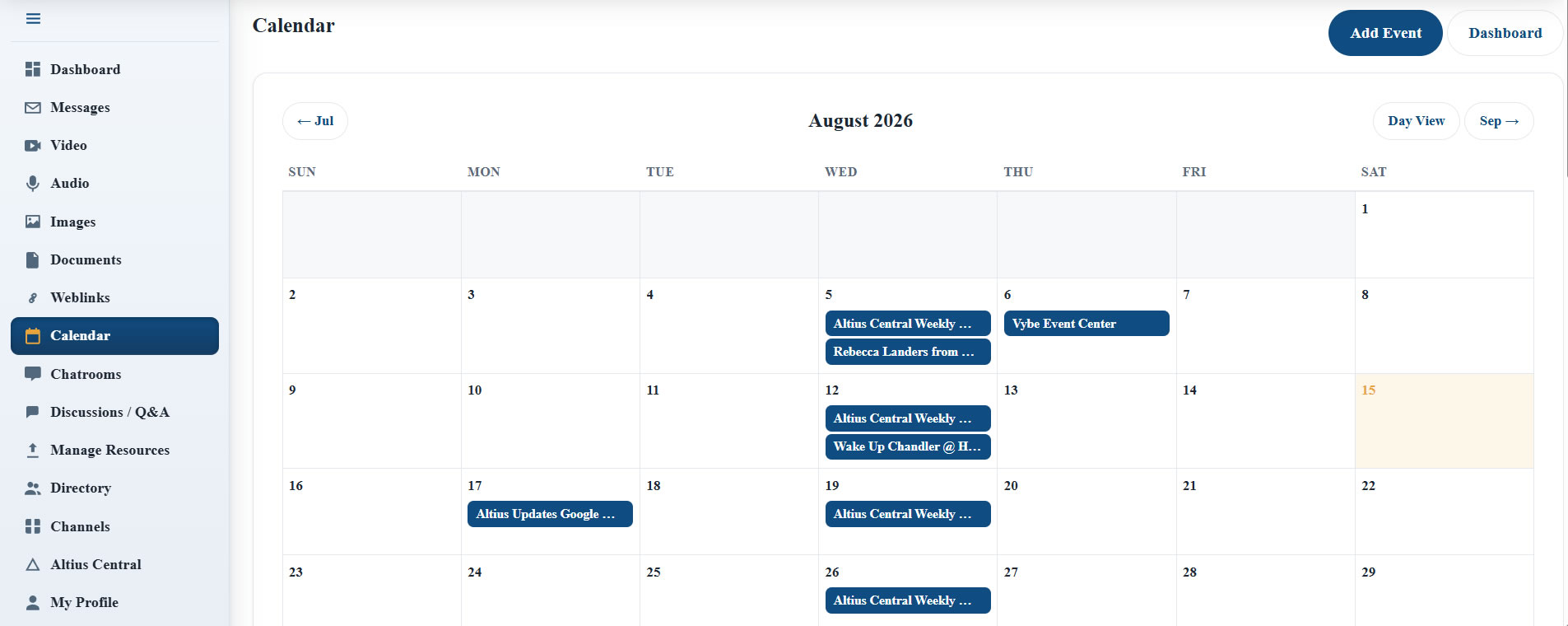
Month and day views, one-click RSVP, live Zoom and Meet links. Events can span days (a three-day conference shows on all three) and repeat weekly, biweekly, or monthly, each date with its own attendee list. Email invitations go to exactly the people you tick, never to everyone who merely has access.
Make it yours
Rename any section to fit how your business talks: Forum becomes Q&A, Channels becomes Groups. Every person arranges their own sidebar and dashboard, drag once and it stays, and chooses between the sidebar and classic views. Welcome emails, templates with merge tags, and a full send log are built in.
Altius Workspace vs Slack
A fair comparison, because the differences are structural, not cosmetic.
| Slack (free plan) | Altius Workspace | |
|---|---|---|
| Group chat | Channels whose history is hidden after 90 days | Chatrooms, channel-wide or invite-only, with permanent history |
| Your message history | Hidden after 90 days unless you upgrade | Yours. Forever. |
| Where your data lives | On Slack’s servers, under Slack’s terms | In your own database, on your own website |
| File attachments | Storage capped; files vanish with the history that carried them | Up to 4 per message, 200MB combined, kept as long as you keep them |
| Voice notes | Audio clips are a paid-plan feature | Included, recorded in the browser, played in the thread |
| Knowledge base | Answers scroll away with everything else | A forum where marked answers stay put and stay findable |
| Events and RSVPs | Not built in; bring another tool | Full calendar with RSVP, recurring series, and email invitations |
| A portal for clients or members | Not what it’s for | Built in: protected resources, discussions, and events for the people you serve |
| Fits your business language | Slack’s names for things | Rename any section; it speaks the way your team does |
| If you leave | Export what the plan allows, then start over | There is no leaving. It’s your site and your database. |
Slack comparison reflects Slack’s published free-plan limits as of August 2026. Slack is a trademark of Salesforce, Inc.; no affiliation implied.
Where it’s headed
The Workspace is a living product. Here is what’s on the bench, being built the way the rest of it was built: deliberately.
Member-to-member messaging Coming soon
Direct messages between members, arriving with the safeguards designed in from day one: group boundaries, per-member permissions, one-click blocking, and confidential reporting with a real moderation trail.
Google Drive storage Coming soon
Keep the Workspace on your site while its files live in your own Google Drive. Storage-hungry libraries on storage-light hosting, with every permission check still enforced by the Workspace.
Notifications with the browser closed Coming soon
Today’s desktop notifications work while a Workspace tab is open. True push, pinging your device even with the browser closed, is the next tier.
Event reminders Coming soon
Automatic reminders to everyone who RSVP’d, with the meeting link in the email, timed ahead of the event.
Shared libraries across sites Coming soon
Publish a resource library once and have it appear, current and complete, in every Workspace that subscribes to it.
The Altius ecosystem Coming soon
An upgrade path connecting the Workspace to the wider Altius platform: CRM integration through SuiteCRM, Google Calendar sync, scheduling, quoting, and invoicing, one ecosystem behind one login.
See it live in five minutes.
The fastest way to understand the Workspace is to watch it work. Bring your questions.
Ask for a walkthroughOnwards.